
Hackode
Tools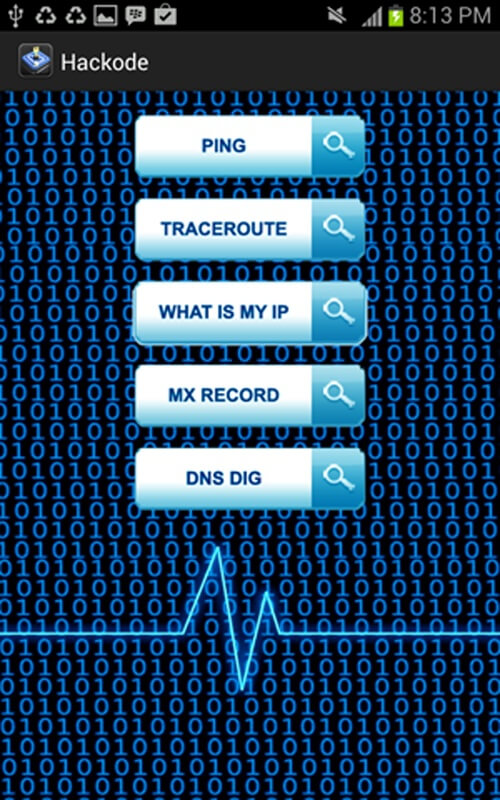






Hackode is an Android utility aimed at security enthusiasts and penetration testers. It offers a set of lightweight tools to help you discover common vulnerabilities on devices and networks.
This page provides the latest APK, basic installation instructions, and practical information you need before installing Hackode on your device.
Quick Information
| App/Game Name | Hackode |
| Latest Version | 1.1 |
| Developer | Not listed |
| Category | Apps / Tools |
| App Size | 2.01 MB |
| Package Name | com.techfond.hackode |
| Last Updated | 1 October 2026 |
What Is Hackode?
Hackode bundles a collection of basic security functions such as port scanning, network enumeration, and simple vulnerability checks. The app is designed for users who want a portable, on‑the‑go solution for preliminary security assessments without needing a full desktop suite.
Because it is a compact tool (just over 2 MB), it runs quickly on most Android phones and tablets. However, its feature set is limited to core scanning capabilities; advanced exploitation or post‑exploitation modules are not included.
Compatibility
| Android Version | Not Verified |
| Architecture (ARM64 / 32-bit) | Not Verified |
| Internet Connection | ✓ Verified — May be required for ads, updates, or login |
| Storage Needed | Not Verified |
| OBB/Data Files | Not Verified |
| Root Required | Not Verified |
How to Install
- Open your device’s Settings → Security (or Privacy) and enable Install unknown apps for the browser or file manager you will use.
- Download the Hackode APK file to your device.
- Locate the downloaded file using a file manager and tap it to start the installation.
- Follow the on‑screen prompts and grant any requested permissions (e.g., network access).
- Once installed, open Hackode from the app drawer and begin using its scanning tools.
Troubleshooting
- App not installed: Ensure you have enabled installation from unknown sources and that the APK file is complete (no download interruptions).
- Crashes on startup: Verify that your Android version meets the minimum requirement (generally Android 5.0+). Clearing app data or reinstalling may help.
- Scanning features do not work: Some network functions may require Wi‑Fi connectivity or, in rare cases, root access. Check that the app has the necessary network permissions.
- Login or online authentication issues: Hackode does not rely on external accounts, so any login prompts are likely from third‑party services; avoid entering personal credentials.
Safety & Security
Hackode is a modified distribution of a security‑focused app. As with any APK obtained outside official stores, verify the source before downloading. Review the permissions the app requests; typical needs include network access and storage for temporary files. Avoid entering sensitive personal data into the app, and consider using a secondary test device for security‑related activities.
Because the app is not signed by a known developer, future updates may not be automatically available. Keep an eye on version releases and re‑download from a trusted source when needed.
How Hackode Compares
| Feature | Hackode | Termux | zANTI |
|---|---|---|---|
| Price / Free model | Free | Free | Free (with optional paid add‑ons) |
| Platform availability | Android | Android | Android |
| Standout feature | Compact set of basic scanning tools in a single lightweight app | Full Linux terminal environment with extensible packages | Comprehensive network audit suite with GUI reporting |
| Best for | Quick, on‑the‑go vulnerability checks | Power users who need a command‑line Linux experience on Android | Professional pen‑testers requiring detailed network analysis |
Alternatives
Other well‑known Android security tools you might consider include:
- Termux – Provides a full Linux terminal, allowing installation of many security utilities such as Nmap, Metasploit, and more.
- zANTI – Offers a graphical interface for network mapping, vulnerability assessment, and reporting, suitable for both beginners and experts.
- Kali NetHunter – The official penetration‑testing platform for Android, featuring a wide range of tools and hardware integration.
Final Verdict
Hackode is a handy, lightweight option for users who need basic scanning capabilities without the overhead of a full Linux environment. It works well on most modern Android devices, but its limited feature set means it is best suited for quick checks rather than deep assessments. Verify the APK source, review permissions, and consider a more comprehensive tool like Termux or zANTI if you require advanced functionality.
Frequently Asked Questions
The APK is not from an official store, so you should download it from a trusted source, check the file’s integrity, and review the permissions it requests.
Hackode runs on Android 5.0 (Lollipop) and newer, though performance may vary on older devices.
Basic scanning functions work without root, but some advanced network features may require root privileges.
If you already have a previous version of Hackode, you can install the new APK directly; the installer will replace the older version.
This usually happens when installation from unknown sources is disabled or the APK file is corrupted; enable the setting and re‑download the file.
Hackode is offered as a free APK without built‑in ads or in‑app purchases.
Older versions are not listed here; you would need to search reputable archives that keep historic APK releases.
Since Hackode is not tied to an official update channel, a new version may introduce changes; always back up any important data before updating.